
Remini - AI Photo Enhancer
Bending SpoonsPhotography
4.122.25K Reviews
- Version
- 3.7.1481.202527105
- Installs
- 500.00M
- Age Rating
- Everyone
Screenshots

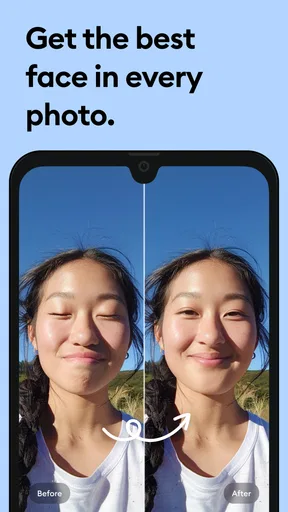




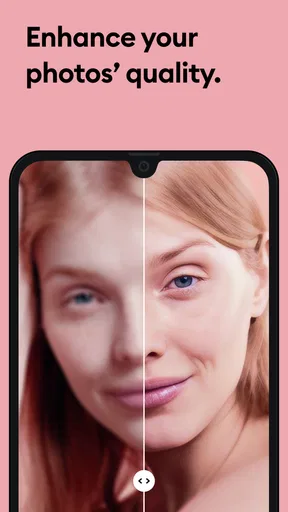

Our Review of Remini - AI Photo Enhancer
 Analysis by Appyee
Hey there! So, I recently got my hands on Remini - AI Photo Enhancer, and let me tell you, it’s quite the app if you’re into photo editing or just want to jazz up your old pics. I’ve been playing around with it for a bit, and here’s the lowdown on what it’s all about and how it performs.
First Impressions and Features
When you first open Remini, you’re greeted with a pretty straightforward interface. It’s not cluttered, which I appreciate. You won’t have to dig through menus to find what you need. The app’s main selling point is its ability to enhance low-quality photos using AI, and boy, does it do a decent job at that.
One of the coolest features is its ability to bring old photos back to life. I dug out an old, blurry photo from my college days and ran it through the app. The transformation was impressive; it sharpened the image and brought out details I thought were long gone. It’s almost like magic, but in app form!
Using the App
Getting started with Remini is a breeze. You simply upload a photo from your gallery, and the app does its thing. The enhancement process is usually quick, but it can take a little longer for larger files. Patience is key here, folks!
There’s also a neat feature that lets you compare the before and after versions of your photo. It’s pretty handy for those who love a good side-by-side comparison. Plus, if you’re feeling a little artsy, there are options to enhance the photo in different ways, like adding a bit of color or sharpening specific areas.
Performance and Usability
Performance-wise, the app is solid. It doesn’t lag, and I haven’t experienced any crashes. The AI seems to handle most enhancements without breaking a sweat. However, if you’re working with extremely low-resolution images, the results might not be as mind-blowing. But hey, it’s not a miracle worker—just a really smart app!
The user interface is intuitive, with easy-to-navigate menus and clear options. You don't need to be a tech wizard to figure it out, which is a huge plus in my book. The app also offers a free version that allows a limited number of photo enhancements per day. If you’re a heavy user, you might want to consider their subscription model for unlimited access.
Final Thoughts
Overall, Remini - AI Photo Enhancer is a nifty tool to have for anyone looking to improve their photos without spending hours in Photoshop. It’s straightforward, efficient, and quite fun to use. While it may not replace professional editing software for detailed work, it’s perfect for quick fixes and breathing new life into old memories.
Whether you’re a casual user or a photo enthusiast, Remini offers something worth checking out. So, if you’ve got a pile of old photos gathering digital dust, why not give them a new lease on life with this app? You might be pleasantly surprised at what a little AI magic can do!
Privacy and Permissions
See what permissions an app requests and how it handles your data.
- Photos/Media/Files
- read the contents of your USB storage, modify or delete the contents of your USB storage
- Storage
- read the contents of your USB storage, modify or delete the contents of your USB storage
- Camera
- take pictures and videos
- Microphone
- record audio
- Wi-Fi connection information
- view Wi-Fi connections
- Other
- view network connections, full network access, reorder running apps, control vibration, prevent device from sleeping
Verdict
Strengths of Remini - AI Photo Enhancer
- Enhances photo quality with ease.
- User-friendly interface for quick edits.
- Supports batch processing of images.
- Offers restoration of old photos.
- Provides real-time editing previews.
Limitations of Remini - AI Photo Enhancer
- Free version has limited features.
- Requires internet for processing.
- Ads can be intrusive in free version.
- Occasional over-processing of images.
- Subscription can be pricey for some.
Other Releases by Bending Spoons
View All
Splice - Video Editor & Maker
Video Players & Editors3.6

Filmic Pro: Mobile Cine Camera
Photography2.3
Similar Picks in This Category
View All
Google Photos
Google LLC4.4

Gallery
Google LLC4.2

Picsart AI Photo Editor, Video
PicsArt, Inc.3.9

B612 AI Photo&Video Editor
SNOW Corporation4.1

BeautyPlus-Selfie Photo Editor
PIXOCIAL TECHNOLOGY (SINGAPORE) PTE. LTD.4.5

FaceApp: Perfect Face Editor
FaceApp Technology Ltd4.3
You May Also Like
View All

Frequently Asked Questions
What is Remini - AI Photo Enhancer and how does it work?
Remini is a cutting-edge AI-powered app designed to enhance, restore, and improve photo quality. Using advanced AI technology, it analyzes images to enhance details, sharpen resolution, and bring clarity to old or blurry photos. Perfect for revitalizing cherished memories, it provides users with a seamless way to breathe new life into their photo collections.
Is Remini free to use, or does it require a subscription?
Remini offers both free and premium versions. The free version allows users to enhance a limited number of photos each day. For unlimited enhancements and additional features, users can opt for a subscription. The premium version provides a more comprehensive experience with fewer restrictions and access to advanced tools.
What devices is Remini compatible with?
Remini is compatible with both Android and iOS devices. It requires a minimum operating system version to function effectively, so users should ensure their device is updated to the latest software to enjoy the best performance. It can be downloaded from the Google Play Store for Android users and the Apple App Store for iOS users.
Are there any privacy concerns when using Remini?
Remini takes user privacy seriously. The app processes images on secure servers, and while it requires access to photos for enhancement, it does not store or share personal data without consent. Users should review the app’s privacy policy to understand how their data is handled and ensure it aligns with their privacy preferences.
What types of photos can Remini enhance?
Remini excels at enhancing a wide variety of photos, including old, damaged, low-resolution, or blurry images. It's particularly effective with portraits, bringing out details in faces and features. However, the results may vary depending on the original photo's quality, and extremely pixelated images may not achieve perfect clarity.
